LinkedIn Profile Optimization Checklist for Personal Branding & Growth
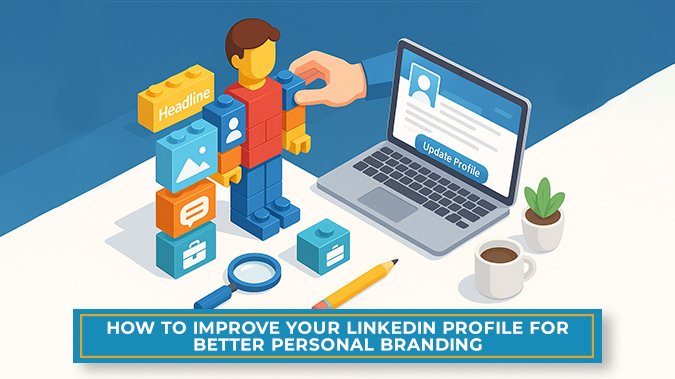
LinkedIn is a widely used platform for professionals across industries. Whether someone is building their career from scratch or pivoting into something new, their LinkedIn profile tells the story before they ever say a word.
For many people, a LinkedIn profile may be the first place a recruiter, client, or colleague learns about them. For those looking to understand how to improve a LinkedIn profile, this guide offers a practical overview of what that process can involve.
What Does Optimising a LinkedIn Profile Involve?
Optimising a LinkedIn profile means reviewing each section and making small updates to improve how the information is presented. The aim is to make the profile easier to understand for someone visiting it.
From the photo you choose to the words you write, everything either helps or hurts the impression you make. Using a LinkedIn profile optimisation checklist can help guide this process, so nothing important is missed.
Why LinkedIn Profile Optimisation Matters
Personal branding on LinkedIn often comes down to making sure that the profile matches how someone wants to be seen in their professional space. A complete and thoughtfully written profile can help with that.
When a profile includes clear job titles, accurate summaries of work, and relevant skills or certifications, it becomes easier for others to get a sense of the person’s background. This is especially important for those who are applying for new roles or sharing content related to their field.
Optimising the profile can also support visibility. When profiles are filled out fully and include common terms related to one’s industry, it may help them appear more often in search results.
In some cases, professional LinkedIn Optimization Services may be useful for those wanting to improve how they appear online.
LinkedIn Profile Optimization Tips for Personal Branding
Below are some specific areas of the LinkedIn profile that can be reviewed or updated:
- Design and upload LinkedIn banner image that reflects your personal brand, industry, or professional interests.Ensure your LinkedIn profile picture is recent, clear, and professional to make a strong first impression.
- Write impactful headline that highlights your current role, key skills, or professional goals.
- Include compelling About section that summarizes your overall experience, strengths, achievements, and what you're looking for professionally.
- Create Custom ULR for LinkedIn profile that is easy to share and looks more professional-looking.
- Regularly update your work experience, roles, and responsibilities to reflect your most recent achievements and job changes.
- List and showcase relevant skills, prioritize the most important ones, and remove irrelevant and outdated skills from LinkedIn profile.
- Add and highlight certifications, completed courses, and major projects on LinkedIn profile that demonstrate your expertise and professional growth.
- Frequently keep sharing valuable content, insights, and updates that establish your credibility.
- Make connections with colleagues, industry peers, and professionals in your field to expand your LinkedIn network.
- Engage with posts related to your industry, participate in discussions, and consistently update your profile to remain visible and active in your professional LinkedIn community.
Use a Recent, Professional Profile Photo
A clear profile photo can help others recognise you and give the profile a more finished appearance. It doesn’t need to be formal or taken by a professional photographer, but it should be well-lit and recent. People often find it easier to connect with a profile when they can see the person behind it.
Choose a Suitable Background Banner
The banner image that appears behind the profile photo can be used to add subtle context. Some choose to keep it simple, while others may add a graphic that reflects their industry or work style. If you’re investing in broader SEO services, this is one of the first things they’ll advise you to upgrade.
Update the Headline with a Clear Focus
Headlines come immediately below the profile name and are usually defaulted to a current role title, but users can edit them to suit work and professional focus. If your headline goes on to say, "Marketing Manager at XYZ Company," you’re not using it effectively.
Something like: Building scalable content strategies for SaaS brands that convert. That’s a value proposition. The right headline improves searchability and instantly connects your name to your impact.
Write or Edit the About Section
The About section is often the most personal part of the LinkedIn profile. It’s a space to give a short overview—what you do, what you’ve worked on, and where your strengths lie.
Too many profiles leave this blank or treat it like a resume. But the About section is your chance to share not just what you do, but why you do it.
- Who are you behind the job title?
- What problems do you solve?
- What lights you up professionally?
Create a Custom LinkedIn URL
LinkedIn lets you cook up your custom profile link. This makes the link shorter, easier to remember, and more professional when shared on resumes or email signatures.
How to make a good profile on LinkedIn? Start by editing your profile URL directly from profile settings; it takes just a few minutes to set up.
Keep Experience and Roles Up to Date
The Experience section is where everyone’s eyeballs land first on LinkedIn. You might prefer to keep that bit fresh, especially if you’ve climbed the ladder or switched things up recently.
Just jot down a couple of quick bullets or a short blurb about what you actually did. People want to know what went down, and describing the work can help others understand what the job involved.
Review the Skills Section
LinkedIn allows users to assign as many as 50 skills. It is always advisable to assign up to five newest ones that are the closest to present interests or objectives. Additionally, users have the option to rearrange their skills so that their stronger areas are represented in the top three.
Add Certifications and Projects
There are sections where a person can list professional certificates, online courses, or projects that they've completed. Project work and certifications can set you apart from other professionals in your sector. They exhibit initiative, development, and practical experience.
Post Content That Positions You as a Thoughtful Voice
This is the best way to improve your LinkedIn profile. Toss up a quick post now and then, even if it’s just you rambling about what you’re learning lately or some wild challenge you tackled.
Drop a comment on someone else’s post, too, and not the generic “Great point!” but share a real thought. LinkedIn loves people who show up and actually interact.
Build and Maintain Meaningful Connections
Just hitting “accept” on every random LinkedIn request may not be the best or the right move. Building a network is like making friends at a party; you don’t just shake hands with everyone and call it a day. You take your time, actually talk to people you’ve met.
When you send a connection request, don’t be that person who just clicks and ghosts. Toss in a quick note. It makes the connection feel more intentional and meaningful.
Stay Involved Over Time
Your profile remains active through engagement. If you just polish your profile but never show up, people will forget you exist. Engagement tells them you’re present, professional, and ready.
Final Thoughts
If you’re trying to land a job or meet new connections, these moves are definitely going to help. Don’t worry if you’re still feeling lost in the LinkedIn jungle.
At Saletify Digital Marketing Company in Pune, we offer custom solutions tailored to your goals, bring deep industry expertise, and work with an agile, responsive team that actually gets things done. Connect with our team today and start showing up as the professional you truly are.